To build a successful online business, corporations first need to understand the platform behind it. Other than the core foundational insight, investing in a professional Shopify web design from the start is the strategic step that turns your vision into a polished, professional digital space, whether you're an Australian business planning your first online shop or rebuilding an existing one.
A well-optimised website is more than the brand's public face. It's leverage for lifting conversion rates and keeping your business running smoothly. When you design a website on Shopify, careful attention to each content block and a logical layout make the customer journey, from finding a product to paying for it, feel seamless and remove the technical barriers that can stand in the way of a purchase.
What is Shopify?
In the fast-moving world of global ecommerce, Shopify has established itself as a leading ecommerce platform, operating with a Cloud SaaS (Software as a Service) model. Unlike open-source software, where the user is required to manage everything from servers to security, Shopify gives businesses a complete, all-in-one ecosystem.
This utility grants business owners complete focus on strategy and customer service rather than complex technical issues. The software not only offers flexible interface customisation, but it also includes a built-in inventory management system, international payments, and smart marketing tools.
When a website is built properly on Shopify, you can set up an online store and get it running smoothly in a short time, while also scaling without limits as your business grows from a small shop into a multinational enterprise.

Why Professional Shopify Web Design Is a Strategic Investment
Investing into a Shopify web design project isn't just about making a good-looking website. It's about building a solid foundation for your digital transformation. With the current era of commercial evolution, your website becomes the most important touchpoint in the customer journey, where their trust is built and buying decisions are made.
An in-depth Shopify web design lets you optimise flow of data between your sales channels, from social media and online marketplaces to physical stores, so customers get a consistent, professional shopping experience.
Notably, Good Shopify web design also focuses on building a smart conversion funnel. We don't just arrange products. We work out the navigation logic to reduce bounce rates and maximise average order value. The strategic benefits include:
- Multichannel sync: Shopify brings inventory and customer data from Facebook, TikTok and Amazon into a single management system.
- Increased brand credibility: An international-standard interface, along with SSL and PCI security, gives reassurance to customers when they make payments.
- Real-time data: Detailed reports on customer behaviour are provided, helping businesses make accurate purchasing and marketing decisions.
Pros and Cons of Shopify
Here's an objective assessment of the Shopify platform that gives the full picture before you invest:
| Criterias | Key Advantages | Things to Consider |
|---|---|---|
| Operation | Very easy to use, with a drag-and- drop interface. No coding knowledge or server management required. | Some deeper theme customisation requires knowledge of Shopify's Liquid language. |
| Performance | Very fast page loads and 99.99% system uptime, even during traffic spikes. | Business pays a monthly platform fee, plus a transaction fee on each successful order. |
| Apps | Massive App Store catalogue supports almost any feature, from shipping and loyalty points to SEO | Premium apps usually carry monthly licence fees, which add to business' total running costs. |
| Support | Professional 24/7 support team and a very well-documented guide. | The ability to modify the checkout process is limited on the basic plans. |
Shopify Pricing
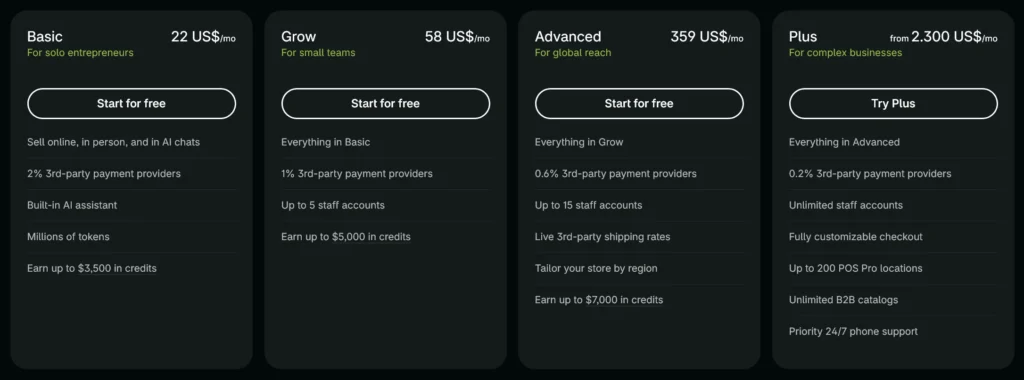
Shopify is a paid, subscription-based software, so it's important to set your operating budget before you start building your website on it. Choosing the right plan keeps costs under control and makes sure you have the tools you need to grow. Shopify offers clear tiers based on the size of your business and your reporting and management needs.
Here are the common plans to consider:
- Basic ($22 USD / $56 AUD per month): A good fit for new shops and solo sellers, with all the core selling features.
- Grow ($58 USD / $149 AUD per month): For growing businesses that need more in-depth reports and additional staff accounts.
- Advanced ($359 USD / $575 AUD per month): The best option for larger brands that need automated third-party shipping rate calculations and advanced custom reporting.
- Plus ($2,300 USD / $3,700 AUD per month): The top tier, built for large enterprises, multinational groups and fast-growing brands.
Who Should Use Shopify?
Shopify is a flexible platform, but it delivers the most value for businesses with clear commercial goals. That's especially true for businesses expanding into international markets (cross-border ecommerce), where Shopify has a clear advantage in global payments and shipping.
Notable business models suitable for a Shopify web design service include:
- Fashion and beauty: Industries that need premium, visual layouts and complex product options such as colour and size.
- Dropshipping and MMO (Make Money Online) businesses: Sellers who need a quick setup and smooth connections to their product suppliers.
- Established brands going digital: Businesses that want a professional online store without a large in-house IT team, because Shopify keeps the technical side simple
| Business type | Benefits of building on Shopify | Scalability |
|---|---|---|
| Fashion and beauty | Premium visual layouts and flexible product variants such as colour and size. | Very high (retail and wholesale) |
| Dropshipping | A UI/UX-standard interface with strong support for product variants | Global |
| Established businesses | Centralised order and inventory management that's easy to use. | Sustainable |
Identifying the right audience at the outset helps you decide on a Shopify web design plan that suits your business and improves the buying journey for each customer group.
A Step-by-Step Guide to Using Shopify
In order to perform Shopify website design or operation effectively after handover, business personnel should be able to grapple with basic administration tasks. Shopify is designed to be user-centred, so learning the system usually takes just about 3 to 5 days. The standard workflow covers managing products, configuring your theme and handling orders.
Once your website is built, mastering these admin skills will save running costs and let business respond quickly to market changes. The steps below use an air conditioning and HVAC equipment store as the worked example:
Step 1: Set up your store details (Settings)
- Settings > Store details.
Enter "CanhCam" as the store name. Set the store currency to AUD if you sell domestically, or USD if you export internationally. You'll see a clean dashboard with fields for your business's legal details.
This is the first foundation for designing a professional Shopify website, establishing a clear brand identity from the very beginning.

Step 2: Choose and customise the user interface (Theme)
- Online Store > Themes > Customize.
CanhCam recommends choosing a theme with a wide layout so you can present large HVAC systems properly. Use a navy and silver colour palette to create a "cool" and "clean" feel. Blending colour and layout right at the design stage lifts the perceived value of technical products, making simple equipments look more professional and trustworthy to project owners.

Step 3: Upload product information (Products)
- Products > Add product.
- What to enter:
- Title: Central chiller air conditioning system, 100 HP.
- Description: Add a specification table covering BTU, EER and R32 refrigerant.
- Tip: Upload at least five photos of the equipment from different angles.
Optimising product data while you build the site not only makes it easy for customers to find information, but is also a crucial element for Google Search Engine to recognise your site's level of expertise, which can improve search rankings for your industrial air conditioning products.

Step 4: Create supporting articles (Pages)
- Online Store > Pages.
Create a case study page. List your ISO certifications and the equipment you have available for installation work. Building trust-focused content pages during the design phase is the best way to show your business's capability clearly.

Step 5: Set Up your Menu (Navigation)
- Online Store > Navigation.
Create a multi-level menu with clear main categories, for example "Cooling equipment > Residential air conditioners / Industrial air conditioners". A smart navigational and organizational structure greatly improves the customer journey.

Step 6: Configure Transaction (Payments)
- Settings > Payments.
Connect PayPal (for international customers) and Manual payment (with a note such as: Bank transfer in line with the installation contract milestones). Flexible payment options are an essential part when designing any Shopify website.

Step 7: Configure Delivery (Shipping)
- Settings > Shipping.
These orders are often heavy and technically complex, so set up delivery quotes based on the size or specific requirements of each job. Fine-tuning your shipping logic while you build the site removes the risk of unexpected costs on bulky equipment.

Step 8: Tax and Payment (Checkout)
- Settings > Checkout.
Turn on "Guest checkout" so project customers can order quickly without creating an account. Keeping verification steps to a minimum is an important behavioural psychology tactic to employ when you design your checkout.

Step 9: Connect Domain and Launch
- Settings > Domains.
Connect your domain (for example, aircon-canhcam.au) and remove password protection to take the website live. This is the final and most important step in setting up your Shopify website. A professional domain and an open storefront let your business start reaching customers around the world.

Shopify vs WooCommerce
Choosing between Shopify and WooCommerce is a common struggle for business owners. Shopify wins on stability and ease of use, while WooCommerce (built on WordPress) offers complete freedom to customise the source code. However, in terms of time cost and security risks, Shopify web design is often the better choice for brands that put sales performance first.
| Features | Shopify (SaaS) | WooCommerce (Open-Source) |
|---|---|---|
| Set Up | Ready to use within minutes | Hosting, SSL and WordPress must be set up manually |
| Maintenance | Shopify handles updates and security automatically | Plugins and Patch security issues must be updated manually |
| Customisation | Within the limits of apps and themes | Free to edit any line of code |
| Support | Direct support from Shopify | Depends on the community and outsourced providers |
Conclusion
Investing in professional Shopify web design isn't about following a trend. It's about building a sustainable, professional foundation for your business. At CanhCam, we combine strategic thinking with up-to-date technology so your Shopify website works as a genuine sales engine. Let us work with you as you take on the Australian ecommerce market in 2026.
Because of that, choosing an experienced team for your Shopify web design shortens the path from idea to launch and helps make sure every setting, from operations to user experience, meets international standards. With dedicated support from CanhCam, you'll have a sales ecosystem that's ready to lift revenue and strengthen your brand's place in the global market.
Frequently Asked Questions (FAQs)
Why should I build my website on Shopify instead of a platform like WordPress or Magento?
Shopify is a closed, secure ecosystem with stable infrastructure, so you don't need to worry about hosting or servers. CanhCam's Shopify web design process gives you a website that runs smoothly and is easy to manage, even for people without technical skills. That's a big advantage over maintaining complex source code on other platforms.
What does the cost of Shopify web design include, and are there extra charges?
The cost typically includes Shopify's monthly subscription, the fee for a custom theme design and the cost of integrating sales apps. At CanhCam, we're transparent about every cost from the consultation stage, so you can make the most of your budget without worrying about hidden costs.
Can I easily edit content and images after the website is finished?
Absolutely. One of the biggest strengths of Shopify is its intuitive, easy-to-use administration system. Once your project is complete, your team can change banners, add new products or set up promotions in just a few minutes. We also provide detailed guides so your business can fully take charge of the system after launch.